
The evolution of hardware in eSports has been remarkable. Console giants like Nintendo, Microsoft, and Sony have constantly tried to keep up with the fast-moving progress of gaming. Nintendo Switch has been among the most celebrated console hardware in recent times. As the product has massively spread its reach across the world lately, it’s a challenge to extend the hardware’s shelf life.
Watch What’s Trending Now!
Every gaming hardware owner wants their respective belongings to have a smooth run for as long as possible. Although for gamers this desire seems too good to be true. Well, if you’re a Nintendo Switch owner then we have found the perfect piece for you. Here are a few tricks and tips that would keep your switch running for longer than you desire. Make sure to have your checklist ready for maintenance.
Extend the life of your Nintendo Switch!
Most of the failures that occurred in the Nintendo Switch hardware or any other console system excluding the technical bummers are attributed to the dust collection in the system. Thus, as with any other system machinery, the system requires cleaning and servicing. This can be done by the owners keeping some simple steps in mind. So, to clean your Switch device, follow the basic steps.
Tools Required: Basic screwdrivers, Precision screwdriver, paper towels, toothbrush or paint brush, compressed air to get it clean. Also to avoid frequent maintenance sessions, a thermal compound possession is recommended.
Start taking apart the system by unscrewing the hardware. Before initiating make sure your SD card is removed. Generally, all the models have one screw at the top and three Philip head screws at the bottom. And there are tri-point screws at the corner and back. To altogether remove the back shell you just need to remove the center screw from the side railing. After removing the outer cover, you’ll have to remove the silver metal covering by unscrewing some more Philip head screws.
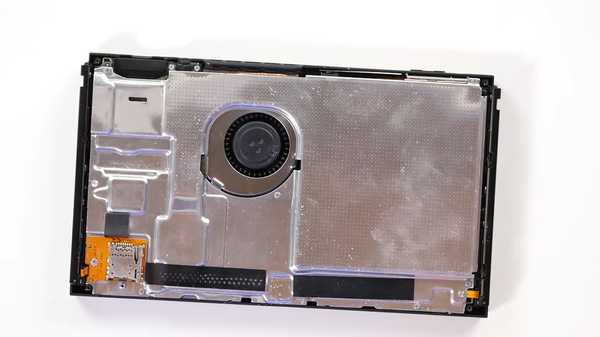
And now you’re in the structure of Nintendo Switch. The first thing you have to do is unplug the battery to avoid any current flow while you work on the system. Now, beginning the servicing, it is advised to remove the thermal compound and clean it with paper towels. But let your moves be subtle.
Read More: Nintendo President Claims Their Research Emphasizes Tech Revolutions Over Novelty Experiences
Also, use the available brush to clean the deposited dust around the fins. Keep the strokes gentle, especially around the fan. If you have previously faced issues with your fan in Nintendo Switch, then you can also clean the fan by unscrewing a few more screws. But only consider the additional step if the fan is facing issues.
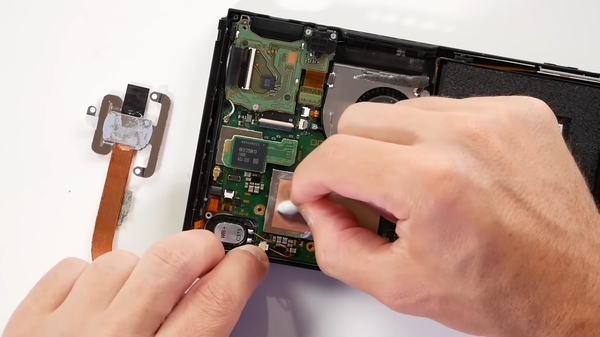
It is important to note that for reassembling the structure, you would have to delicately follow back the steps. To neglect the errors, make sure you click a picture at every step while disassembling the hardware. Also, another piece of advice is to avoid overcompensating the cleaning by breaking the structure more often than required.
Well, until the gaming giants officially announce Nintendo Switch 2, these tips would help you for a smoother gaming experience.
Watch This Story: Nintendo Switch 2 Specs Reveal Generation Changes For The Upcoming Handheld Console
