
Need For Speed Unbound has a very unique art style and graphical upgrade to it that has made it one of the most anticipated games of the year. This is also because of the fact that the game has pinpointed the exact amount of mixture needed for a game to look both visually good and complement the funky and wacky environment designs.

Watch What’s Trending Now!
But even though there is a very complicated system working for the same behind the scenes, some players still want their game to look simple and not very artistic. And it’s totally okay, as the game is all about getting ‘unbound’ and not getting stuck to one style. This is why there is a way players can find a perfect combination to lower their game’s driving effects and play the way they want.
Steps to lower driving effects in Need For Speed Unbound
In the game, there are several ways a player can customize their cars and other tags (Driving Effects in NFS Unbound) by going to the settings. Although initially, EA, before releasing the game said that the game will have a way to turn off the driving effects, it seems that fans have been misled in the matter. Notably, it is not the driving effect that needs to get turned off but rather the smoke and trail light effects that give the game an anime-like appearance.

Although there is no such way as of now by the time of this writing to completely disable the effects, there is a way that it can be toned down to rather nominal effects.
READ MORE: Everything To Know About The Risk And Reward System In Need For Speed Unbound
To do so, however, the player first needs to go to a Safehouse or a Garage and select the Car(s) to apply tags on. After selecting it, they need to navigate through the catalog until they locate the ‘Cloaked’ tag, which actually makes the car somewhat neutral in appearance and even disables the extra wings and line animations that appear while racing the car.
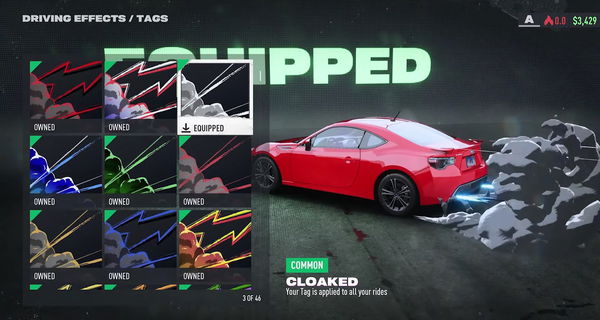
The ‘Cloaked’ tag is actually a simple Grey colored skin for the effects that make it look like the smoke is somewhat natural, while also making the trails look natural and ‘blendy’ with an original car.
WATCH THIS STORY: Best Open World Games on PlayStation, Xbox, and PC
What do you think about this trick to make your game look simple? Let us know in the comments below.
Written by

Edited by

Jito Tenson